

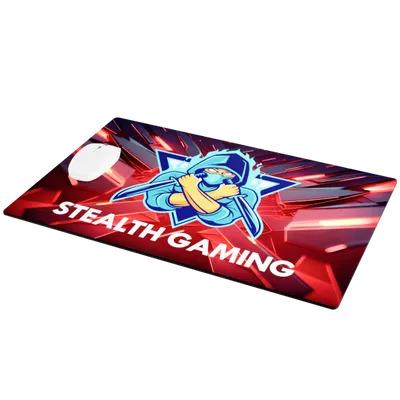
Image from MousePadsNow.com
In the world of gaming gear, mouse pads often get overshadowed by flashy keyboards, high-DPI mice, custom PC cases, RGB lighting setups, and personalized keycaps. Yet, for OG gamers, a mouse pad is far more than just a basic surface—it’s a vital tool that can enhance performance, comfort, and style. Learn various ways to build your own gaming mouse pad and transform a basic accessory into something uniquely yours with creative customization options.
1. Surface Material: Tailoring Texture to Gameplay
When it comes to competitive gaming, every millisecond matters—and the surface material of your mouse pad can be the difference between a clutch victory or a game-losing misclick. The texture beneath your mouse doesn’t just influence comfort; it directly affects precision, speed, and overall responsiveness, shaping how your in-game movements translate into action.
Here’s how different materials stack up for various gaming styles:
- Cloth: Known for offering a soft, textured surface that prioritizes precision and control. Ideal for players who thrive on accuracy—whether you’re lining up that perfect headshot in Valorant or tracking enemy movements in Rainbow Six Siege. Cloth surfaces allow for micro-adjustments, giving snipers and tactical shooters the upper hand.
- Plastic: Built for speed demons who live for fast flick shots and rapid-fire movements. Plastic surfaces offer a smooth glide with less friction, making them perfect for high-octane titles like Apex Legends or Overwatch. If your gameplay revolves around quick reactions and lightning-fast swipes, plastic helps keep you moving at peak efficiency.
- Aluminum: A high-performance choice that brings both durability and a slick, premium feel to your setup. Aluminum pads offer a balance between control and speed, ideal for players who need versatility—think League of Legends macro play or RTS titles like StarCraft II, where both quick actions and precision timing are key.
Choosing the right surface material isn’t just about personal preference—it’s about optimizing your gear to match your playstyle. Whether you’re an FPS sharpshooter, a MOBA strategist, or a battle royale champion, the right texture can elevate your game and give you that extra competitive edge.
2. Size and Thickness: Tailoring to Your Desk and Playstyle
The dimensions of your mouse pad can directly impact your movement freedom and comfort. Choosing the right size and thickness depends on your available space, sensitivity settings, and gaming habits.
Here’s how to find the perfect fit for your desk and playstyle:
Standard Size
Measuring roughly 12 x 10 inches, this is the go-to for gamers with limited desk space or those who prefer minimalistic setups. It’s a solid choice for casual gaming or productivity but might feel restrictive during high-stakes matches that demand broader movements—especially for low-sensitivity (low-DPI) players who rely on sweeping mouse strokes for precision.
Large/Extended Size
For serious gamers who value both form and function, an extended mouse pad—stretching up to 36 inches wide—is a game-changer. It provides a seamless surface that can accommodate both your keyboard and mouse, creating a unified aesthetic while allowing for unrestricted movement. Ideal for low-DPI gamers, streamers, and anyone who appreciates an organized, cohesive setup that doubles as desk protection.
Thickness Options
Mouse pad thickness can be just as important as its size, influencing both comfort and performance:
- Thin Pads (2mm–3mm): Perfect for gamers who prefer a firm, stable surface with minimal cushioning. These pads offer a closer feel to the desk, making them ideal for fast-paced gameplay where quick reactions and stability are key.
- Thick Pads (4mm–5mm): Designed for extended sessions, these pads provide extra cushioning, reducing wrist fatigue during those long Elden Ring marathons or late-night grinding in World of Warcraft.
Before making a choice, take stock of your desk space, your preferred sensitivity settings, and your overall gaming style. A well-matched mouse pad size and thickness won’t just complement your setup—it’ll enhance your performance, providing the comfort and range you need to stay at the top of your game.
3. Edge Design: Enhancing Durability and Comfort
The edges of a mouse pad can impact both its longevity and comfort:
Stitched Edges
Stitched edges are built for longevity. Reinforced stitching prevents fraying, even under heavy use, making them a smart choice for gamers who put in long hours or play at high intensity. A well-stitched border also adds a subtle aesthetic touch, giving your setup a more polished, professional appearance.
Non-Stitched Edges
For those who prefer a seamless look and feel, non-stitched edges offer a smooth transition from pad to desk. While they provide a more minimalist aesthetic, they’re more susceptible to wear over time—especially along the edges where constant wrist movement can cause gradual deterioration.
If longevity is your priority, opting for stitched edges ensures your mouse pad remains intact through countless gaming sessions without compromising comfort or style.
4. Base Material: Ensuring Stability During Gameplay
A secure, non-slip base ensures that every movement you make translates accurately on-screen, minimizing distractions and helping you stay locked in during critical moments.
Rubber
The most common and reliable option, rubber bases offer a strong grip on nearly any surface. They keep your pad firmly in place, preventing slips during fast movements or sudden flicks, making them ideal for competitive FPS or MOBA players who rely on precision.
Silicone
For gamers seeking added flexibility, silicone bases adapt more effectively to various desk textures. They provide a slightly softer grip while maintaining excellent stability, especially useful for unconventional or textured desk surfaces.
5. Aesthetics and Personalization: Reflecting Your Gaming Persona

Top view gaming setup image from Pexels.com
Customizing your mouse pad goes beyond functionality, transforming your space into a reflection of your unique gaming identity.
Custom Graphics
Your mouse pad can become a canvas for personal expression. Whether it’s your gamer tag, clan logo, favorite game art, or original designs, incorporating custom graphics helps your setup stand out and feel truly yours. A personalized design not only enhances the look of your battlestation but also adds a layer of motivation and pride every time you sit down to play.
RGB Lighting
For those who want to immerse themselves fully, integrating RGB lighting brings your setup to life. With dynamic color effects and customizable patterns, RGB can complement the mood of your game or synchronize with the rest of your rig, adding a vibrant, immersive energy to your gaming environment.
A personalized mouse pad isn’t just about aesthetics—it’s about creating a space that feels uniquely yours, enhancing focus, immersion, and overall enjoyment during every gaming session.
6. Specialized Features: Catering to Specific Needs

Image from MousePadsNow.com
Custom Sizing
Every gamer’s space is unique, and custom sizing ensures your mouse pad fits your specific needs. Whether you’re working with a compact setup for tight spaces or need an oversized pad for full desk coverage, tailoring the dimensions allows for a seamless, clutter-free experience that complements your playstyle.
Wireless Charging
For those looking to reduce cable chaos, integrated Qi wireless charging is a game-changer. It allows you to power up compatible devices—such as smartphones or wireless earbuds—directly from your mouse pad. This feature keeps your desk tidy and ensures your essential gear is always charged and ready.
USB Passthrough
Built-in USB passthrough ports add another layer of convenience, offering quick and easy access for connecting peripherals. Whether it’s your headset, external storage, or additional devices, this feature streamlines your setup and keeps your workspace organized without the need for extra hubs.
These advanced features not only enhance your gameplay experience but also contribute to a more efficient, streamlined setup—one that’s as practical as it is powerful.
7. Maintenance and Cleanability: Prolonging Your Investment
A mouse pad’s longevity is influenced by its ease of maintenance:
- Water-Resistant Coating: Spills happen—especially during long gaming marathons. A water-resistant coating helps protect your mouse pad from accidental damage, making cleanup quick and easy.
- Machine Washable Materials: Some cloth pads are designed for hassle-free maintenance and can handle machine washing without losing their shape or texture.
Regular maintenance preserves the pad’s appearance and functionality, like routine wiping and avoiding exposure to extreme heat can extend the lifespan of your mouse pad providing a consistent gaming experience.
In conclusion, a gaming mouse pad is more than just an accessory; it’s a customizable tool that can enhance both your performance and comfort. By considering factors like material, size, edge design, and specialized features, you can create a setup that truly reflects your gaming style and supports your competitive edge.
For a wide selection of customizable mouse pads tailored to suit any gaming preference, explore MousePadsNow.com and take your setup to the next level.