
EZRemove.ai is a free AI-powered online tool that helps users remove backgrounds and unwanted objects from photos instantly. Discover its smart features, practical use cases, and step-by-step guide for clean, professional results without Photoshop.
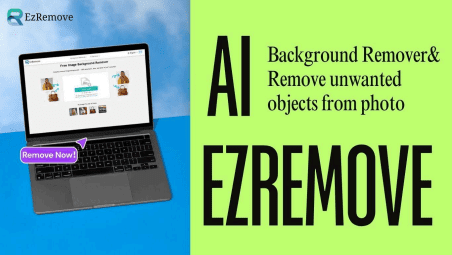
In today’s digital world, clean and professional visuals are essential for everything from eCommerce listings to social media content. Yet, editing photos manually often requires expensive software and technical skills. EZRemove.ai offers a simple, AI-powered alternative — an AI Background Remover and AI Object Remover that automate image cleanup in seconds. It allows anyone to achieve professional-quality results instantly, for free.
Pain Points and Problems
Photo editing used to be time-consuming and complex. Users often face challenges such as:
● Difficult software: Programs like Photoshop require expertise and paid subscriptions.
● Inconsistent results: Manual background removal can leave rough edges or distorted details.
● Limited mobile tools: Many mobile erasers struggle with high-resolution images or precise control.
● Cost and time pressure: Businesses and creators need quick, scalable solutions without recurring fees.
These issues make traditional tools less practical for everyday users or small teams. This is where EZRemove.ai’s AI Background Remover and AI Object Remover come in.
Solution and Key Features
EZRemove.ai addresses these pain points with a 100% online, AI-driven solution. Its intelligent algorithms automatically detect image subjects, separate them from backgrounds, and reconstruct missing areas after object removal.
Key Features:
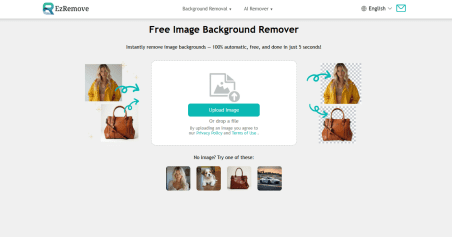
1. AI Background Remover:
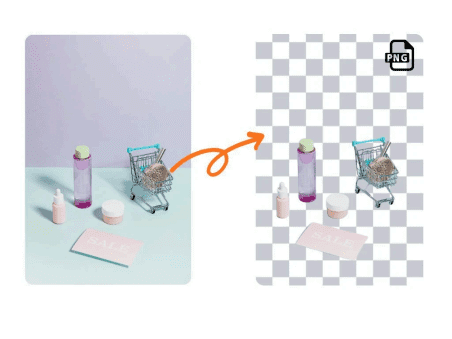
Automatically identifies the main subject and removes the background with
pixel-level accuracy. Users can download transparent PNG files or add new backgrounds instantly.
2. AI Object Remover:
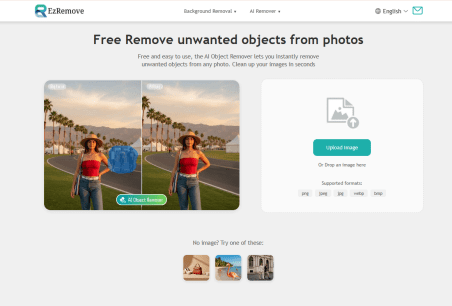
A simple brush-and-erase tool that removes unwanted objects like text, people, or wires. The AI fills the gap naturally without visible marks.
3. Batch Processing:
Supports multiple images at once, ideal for product photography or marketing materials.
4. Mobile and Web Accessibility:
Fully compatible with smartphones, tablets, and computers — no installation required.
5. High-Resolution Output:
Maintains original sharpness and clarity, making results suitable for eCommerce, print, and social media.
With these two AI tools, EZRemove.ai provides a fast, intuitive, and cost-free solution for photo cleanup.
Detailed Tutorial / Step-by-Step Guide
For AI Background Remover
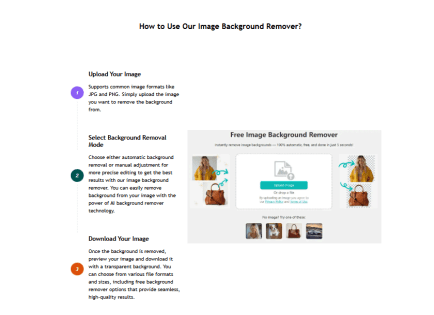
1. Upload Image: Drag and drop your photo or click “Upload Image.”
2. AI Detection: The system automatically separates the subject from the background in seconds.
3. Download or Replace: Download a transparent PNG or replace the background with a solid color or another image.
For AI Object Remover
1. Upload Photo: Choose the image that needs cleanup.
2. Brush & Erase: Highlight unwanted elements with the brush and click “Erase.” 3. AI Reconstruction: The system intelligently fills in the removed area with realistic background textures.
4. Download Result: Save the clean image in high resolution, watermark-free.

Both tools deliver instant results — no waiting, no learning curve, and no hidden fees.
Use Cases and Real-Life Applications
EZRemove.ai’s AI Background Remover and Object Remover are designed for multiple practical scenarios:
● ECommerce Sellers: Create professional white or transparent product images to meet platform requirements and boost conversion rates.

● Designers and Marketers: Save time on repetitive background cleanup and focus on creative layout design.
● Photographers: Clean travel or wedding photos by removing distractions like tourists or cables.
●SocialMediaCreators:Buildvisuallyappealingpostsandprofile imageswith consistentbackgrounds.

● Everyday Users: Improve personal photos by removing clutter or replacing dull backgrounds with scenic visuals.
These applications demonstrate how the AI Background Remover and AI Object Remover simplify editing for anyone, regardless of skill level.
FAQ
Q1: Is EZRemove.ai completely free?
Yes, the platform is 100% free with no subscriptions or watermarks.
Q2: Does it support mobile devices?
Yes. The web interface works seamlessly on smartphones, tablets, and PCs.
Q3: What file formats are supported?
EZRemove.ai supports JPG, PNG, and WebP for both single and batch uploads.
Q4: Is my data secure?
Yes. Images are transmitted via encrypted channels and automatically deleted after processing.
Q5: Can I use the output commercially?
Absolutely. The processed images are free for personal or commercial use. Conclusion and Call to Action
EZRemove.ai offers a simple yet powerful way to enhance your photos through artificial intelligence. With the AI Background Remover and AI Object Remover, users can clean, edit, and refine images in seconds — without technical skills or extra cost.
Whether you’re preparing a product listing, editing vacation photos, or creating marketing materials, EZRemove.ai delivers professional-grade results effortlessly.
Try it today and experience the future of AI photo editing:
�� Visit EZRemove.ai to remove backgrounds or unwanted objects instantly.