

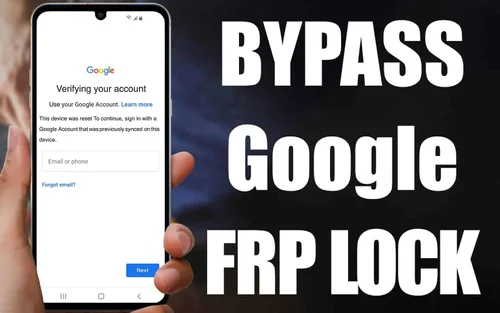
Google FRP (Factory Reset Protection) has been applied to Android devices to prevent the risk of unauthorized access. Sometimes, you may not be able to access your device because of FRP security if you forget the password. You will also want to bypass FRP if you have bought a used device.
You can use the built-in settings or third-party software to adopt a FRP bypass procedure. You can then bypass the security for different Android devices like Lenovo, Android, Motorola, and more. This blog will cover all the prominent methods to remove FRP locks without any risks.
Part 1: Causes of FRP Lock
Your Android device may enable the FRP lock feature for a wide range of reasons. Once it enters this feature, you will have to opt for FRP bypass. Some of the key reasons for the phone to enter FRP lock are as follows:
- Factory reset: When you factory reset your device without logging out of the Google account, the phone will enter the FRP lock method. Before the device is completely reset, the user will be required to enter their old Google account information. Thus, the factory reset may not completely remove your Android account. But you will activate FRP, for which you will have to bypass FRP again.
- Security updates: The FRP can get triggered if any security flaw is noticed in your device. However, the FRP will only be enabled by specific devices for security updates. You will then have to unlock Android phone using the password to keep using it.
- Device theft: If the device is destroyed or damaged, the owner may trigger an FRP lock in the device. This type of lock is usually initiated remotely. Therefore, if your device is stolen at any time, you will have complete flexibility to initiate the lock. As the device will be restored to its original settings, the robber may not be able to use it.
Part 2: How to Disable FRP Lock in Phone Without Computer?
You may want to remove your previously synced device from your device if you want to disable the FRP lock in the phone without a computer. You may use the in-built features itself to bypass FRP. To do this, you will have to use Google Keyboard and enter your Android device into Developer mode.
You may have some difficulties opting for FRP bypass Android if you are not that tech-friendly. It is advisable to adopt the right methods serially so that you do not face any struggle. You may provide your device to tech-friendly people to initiate the process.
Here’s how you can bypass FRP using Google Keyboard without a computer:
Step 1: Open the Google account verification screen on your phone. Then, click on the text field. As the keyboard pops up, hold and press the ‘@’ symbol on the keyboard for a long time. From the available options, choose ‘Google Keyboard Settings.’
Step 2: The Google Keyboard Settings screen will appear. On the menu icon, click on the three dots. Tap on the ‘Help & Feedback’ option.

Step 3: On the ‘Help & Feedback’ screen, click on any topic, either a web link or video. As the link appears, click on it to open it.
Step 4: Now open the browser and click on the address bar. Type Settings and hit the enter button. Now, you will be directed to the Settings tab on your phone.

Step 5: Visit the ‘Backup & Reset’ option under Settings and click on ‘Factory Data Reset’. Confirm that you want to reset the phone, and it will start to reboot the device.
Step 6: You can now bypass FRP and set up your phone as a new device.
Part 3: How to Remove FRP Lock with Dr. Fone?
FRP bypass is now possible with third-party software such as Dr.Fone. With Dr.Fone – Screen Unlock (Android), you can bypass FRP lock. However, to use this tool, you will need to have your PC or computer to bypass FRP.
With the help of Wondershare Dr.Fone, you can also remove patterns, PINs, passwords, and fingerprint locks. It is a very user-friendly tool, which means you can just follow the instructions on the screen and bypass FRP without a password.
Dr.Fone has some amazing features that make FRP bypass easy, such as:
- The software has a very easy-to-use interface, ensuring faster browsing.
- Dr.Fone has a high success rate for FRP bypass Android.
- It can bypass FRP with a few clicks without a password.
Wondershare Dr.Fone is compatible with Android devices by brands like OPPO, Redmi, Xiaomi, Realme, Moto, and Lenovo devices. Now, you can follow the steps given below for FRP bypass on these brands using Dr.Fone:
Step 1: Open Wondershare Dr.Fone
Launch the software on your system after downloading and choose Screen Unlock under the Toolbox option.

Now that you have to bypass FRP lock, select Android as your device.

Step 2: Remove Google FRP Lock
In the next screen, select Remove Google FRP Lock.

From the Quickly Remove Google FRP Lock screen, choose the brand for which you want FRP bypass.

Step 3: Download the Driver and Follow the On-Screen Instructions
As soon as you select the brand, Dr.Fone will start the download for the relevant driver.

After the driver is downloaded, turn off the device and connect it to the computer. Hold your Volume Up and Down keys together simultaneously for 3 seconds when the device is connected to your system.

Step 4: FRP Bypass
The FRP bypass process will now begin, and it can take up to a few minutes.

Once the process is complete, you will receive a notification on your screen.

Part 4: Do I Need to Remove My Google Account Before Factory Reset?
Yes, you need to remove the Google account before factory reset of your phone, or it will initiate the FRP lock. Then, you will have to bypass FRP. However, once you factory reset your device, all the data will be lost, which can be extremely risky. Therefore, removing Google accounts will prevent any such unwanted risks.
Conclusion
When you want to bypass FRP in your device, you must adopt the right methods. The good news is that you can bypass FRP on your Android device with or without the software. Overall the risky alternatives, you must choose a reliable solution such as Dr.Fone- Screen Unlock (Android) to initiate a safe FRP bypass Android process.