

Say you’ve finally created an anime character you’re happy with. The face looks right, the outfit has all the details you wanted, and even the background turned out well. Now you want to use that character in another scene, perhaps with a different pose or outfit. How much of your original design will survive the next generation?
That’s one of the challenges you’ll encounter as your projects grow. You need a way to keep track of your characters, reuse what already works, make revisions, and move between tools without constantly starting over.
So, what deserves your attention when building an AI anime art workflow? I’ll walk through the priorities that make the biggest difference, from character consistency and creative control to efficient iteration, using PixAI to show how they work in practice.
Start with consistency
If you’re creating an anime art series, you should test consistency first. Most generators can make a character look exactly right in one generation and noticeably different in the next.
Details like the face shape, hairstyle, proportions, or accessories can start drifting the moment you change the pose, camera angle, outfit, or setting. This is a major issue when you’re working with an original character.
Keep in mind that you aren’t trying to create a collection of attractive but unrelated images. Since you are trying to tell a story, you need to make the same character feel like the same person throughout the entire project.
Because of this, prioritize consistency in your workflow. Generate your character in one scene, then move them somewhere completely different. You can also try a new pose, a fresh outfit, or a different camera angle, and watch which details survive the change.

Pay close attention to how well the generator preserves the face shape, facial features, hairstyle, hair color, and eye color. You should also watch clothing stability, body proportions, and any distinctive character details. Checking these specific areas tells you much more than a single impressive generation ever will.
If you regularly work with original characters, the ability to carry defining details between generations makes the difference between a workflow you can actually build on and one that constantly sends you back to the beginning.
PixAI provides several ways to approach this challenge. It includes reference images, custom Character LoRAs, and specialized tools that lock in key character details during new generations. That structure makes it highly effective when the same character needs to appear repeatedly.
Prioritize control over individual generations
Consistency gets you only so far. Eventually, something in your image will go wrong. Maybe the character looks flawless, but the hands are deformed. Maybe the facial expression misses the scene’s mood entirely.
At that point, what matters is how easily you can fix the problem. If every minor mistake means throwing away the entire image and starting over, small corrections can turn into hours of wasted rendering time.
A practical workflow lets you lock down what is already working and focus your next attempt solely on what failed.
This is where advanced editing and reference tools take over. Instead of asking a model to recreate an entire scene from a blank prompt box, feed it your existing image and use that as the mechanical starting point for the next adjustment.
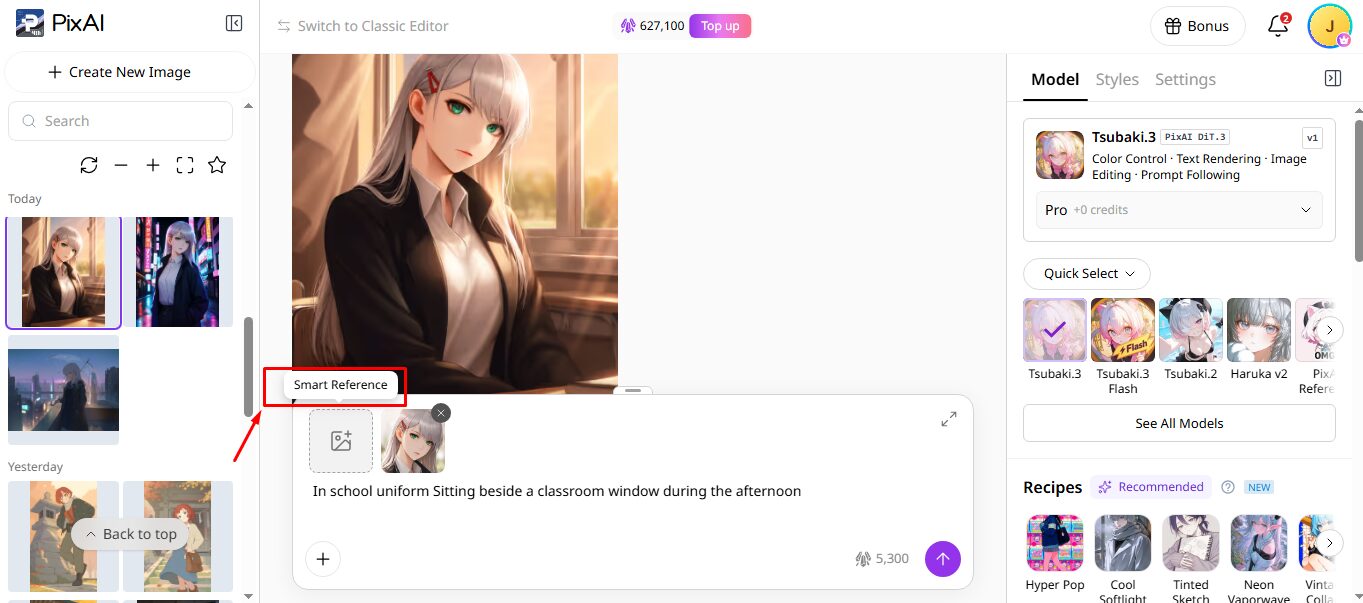
The same logic applies when you move from still images into animation. Your original artwork already contains the character design, setting, composition, and visual style. You want the next production stage to build directly on that foundation, not guess the parameters all over again.
PixAI builds its platform around this exact workflow. Through features like Reference Pro and Smart Reference, you can use any existing generation as a strict blueprint for your next change. For projects that require multiple refining passes, this saves you from constantly rebuilding scenes that were already close to finished.
Build a prompting system you can repeat
Good prompting is not necessarily about writing longer text strings. In fact, an enormous prompt can make troubleshooting almost impossible. If you change ten variables at once and the result improves, you won’t know which instruction made the difference.
A better approach is to give your prompts a clean, logical structure. For a standard character scene, you should categorize your inputs into character identity, active pose, clothing, environment, camera composition, atmospheric lighting, and overarching style requirements.
This approach gives you a template you can easily reuse without forcing every single image into a generic mold. If you want the same character in a new environment, simply swap the environment text. If you want a different expression, edit that specific text block. To try a new camera angle, leave the character description completely intact and adjust the composition settings.
PixAI can support this kind of structured prompting workflow by letting you work with your prompt alongside reference images, models, presets, and other generation controls. Keeping these inputs distinct makes it easier to change one part of the setup while keeping the others consistent.
Over time, you can identify which prompts and settings reliably produce the results you want and turn them into a repeatable system.
Choose a workflow that keeps related tasks together
The number of tools in your workflow can creep up faster than you expect. If you’re generating your image in one app, editing it somewhere else, upscaling it in another service, creating a video elsewhere, and then moving everything into a final editor, your creative process can quickly turn into a nightmare.
There is nothing inherently wrong with using multiple tools. The problem is all the friction happening between them. You have to download files, upload them again, keep track of different versions, remember which settings produced which result, and make sure you’re editing the right image.
That might be fine for a quick experiment. But once you’re producing a series of related images, those little interruptions become part of the actual work.
PixAI Studio addresses this bottleneck directly by connecting its generation suite. You can use nodes in your AI anime art workflow, which will make it easy to create, edit, and refine illustrations. It supports text nodes, image nodes, and video nodes, making it a complete workflow.
 This is valuable when you’re actively building a project rather than simply generating individual images. The fewer times you have to stop, export, upload, and recreate your asset’s context, the more time you have to spend creating.
Make iteration part of the workflow
One of the easiest mistakes you can make when building an AI anime art workflow is treating the first generation as though it is supposed to be finished. Often, you’ll need to make small changes to get close to the perfect image, and a workflow that lets you do that without starting over can make a world of difference.
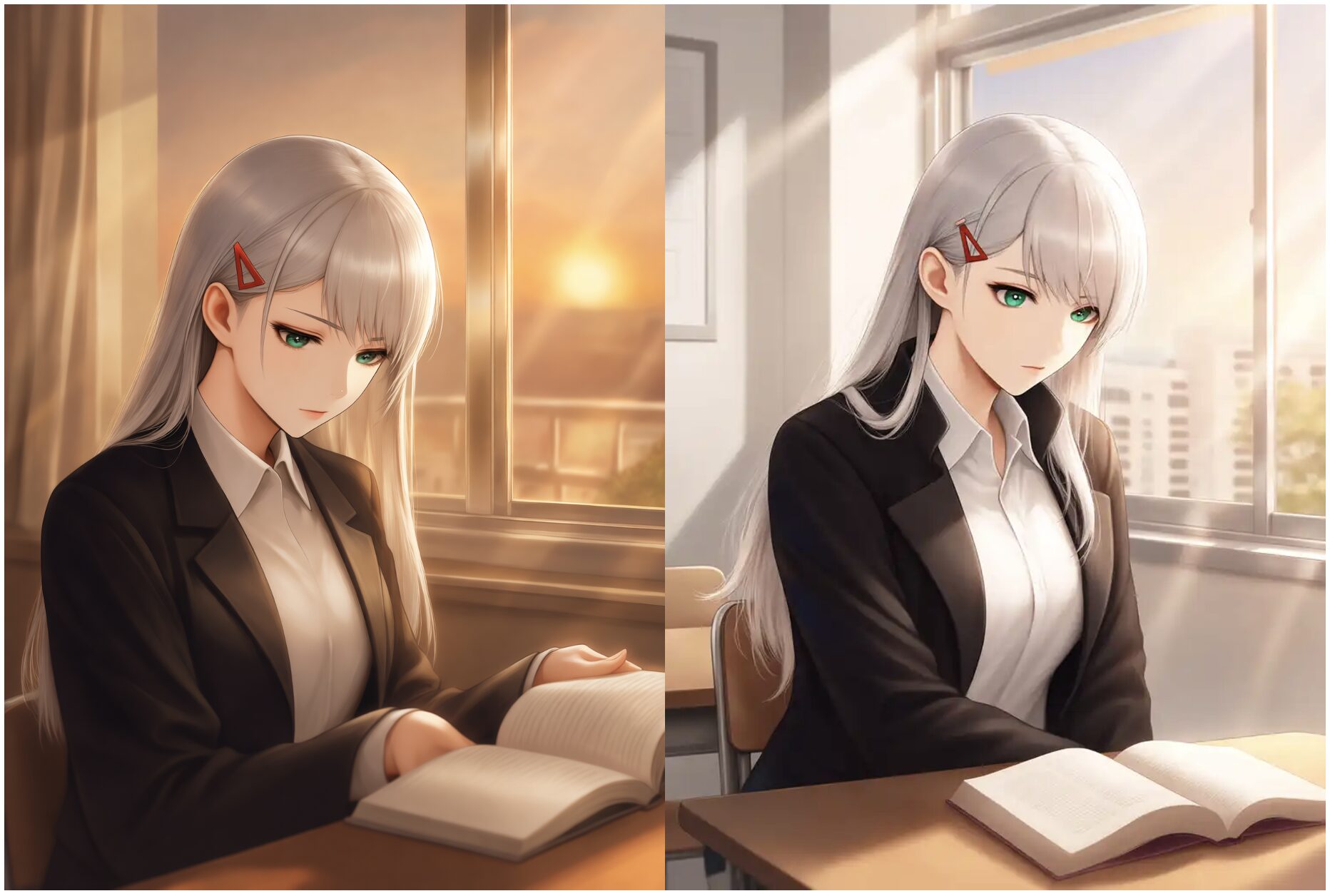
Try changing fewer variables at a time. If you change the prompt, reference image, pose, lighting, character design, and composition at the same time, you lose track of what actually made the new version better.
That sounds simple, but it changes how you approach AI generation. The point is not to find one perfect workflow and use it for everything. It is to build one that works for the specific result you want.
This matters even more for animation, where a tiny problem in the source image becomes much more noticeable once the scene starts moving.
PixAI’s combination of generation, references, editing, and model controls supports this kind of iterative process. It lets you use a strong generation as the base for the next version instead of abandoning it every time you want to make a change.
Match the workflow to the project
There is a massive difference between making a single character portrait and building an entire series around an original character. A simple portrait might need little more than a prompt, a generation, and a few quick edits. A manga project, character collection, or animated series requires a more deliberate process because you’ll revisit the same actors and settings repeatedly.
You must, therefore, consider what you’re actually making before you start building your workflow.
If you’re working on a character portfolio, consistency and editing control are your absolute priorities. On the other hand, for manga or webtoon content, you must focus on repeatable characters, poses, and compositions. For short-form video, your pipeline needs a seamless way to take still artwork into motion.
PixAI naturally supports several of these varying workflows because its anime-focused tools cover different parts of the creative process. You can generate characters and images, make tight edits, and handle animation all in one place. This lets you start small and add more stages as your project develops.
Organize your work before you need to
Once a project has twenty versions of the same character, organizing your work becomes part of the creative process. You’ll need to track the different outfits, poses, scenes, reference images, edited versions, and final exports.
Give yourself some structure early. Keep your strongest character references and save the generations that you want to build on later. If a particular prompt, model, LoRA, or setting configuration produces a result you like, make a note of it.
This habit is incredibly useful because AI art is highly iterative. Today’s almost-perfect image might become tomorrow’s essential reference anchor. You don’t want to spend an hour trying to recreate something you already made simply because you didn’t save the right version.
A good workflow should make it easy to generate the next image while also helping you find and reuse the work worth keeping.
Build around the way you actually create
No single AI anime workflow fits every creator. Start by looking at the stages you repeat. Where do you spend the most time? Where do you keep having to redo work? Which parts of the process require you to jump between several different tools? Those are the areas worth optimizing.
For many anime projects, that means focusing heavily on character consistency, reference-based creation, targeted editing, repeatable prompting, and connected animation engines. You want a pipeline that makes experimentation easier rather than harder.
Final thoughts
A good anime art workflow should make every new image easier to build on. You should be able to return to a character you’ve created, explore different scenes, refine individual details, and experiment with animation while keeping your original vision intact.
If you’re developing a recurring character or a longer creative project, you can explore PixAI to see how its generation, reference, editing, and animation tools work together.
As you develop your workflow, pay attention to the steps you repeat most often and the revisions that take up your time. The goal is to spend less effort recreating previous results and more time developing your characters, stories, and ideas.